

Veeam gives you several backup and retention options that look similar at first, but they behave very differently in real environments. If you misunderstand even one setting, especially restore points vs days, you can end up keeping far fewer backups than you expected.
This guide explains the differences in a practical way using simple day-by-day examples, including the same scenarios covered in this discussion.
Quick takeaway
- A full backup is a complete backup.
- A synthetic full is a full backup built from backup files already in the repository.
- An active full is a fresh full backup read again from the source.
- GFS is long-term retention, not a backup mode.
- 14 restore points and 14 days can produce very different results, especially for weekly backup jobs.
Why this matters
When you configure a Veeam backup job, you are not just choosing how backups are created. You are also deciding:
- how much storage the job will consume
- how much load will be placed on production systems
- how many restore points you will really have
- how long those restore points will remain available
A small setting change can completely change the outcome. For example, on a weekly job, 14 restore points can mean about 14 weeks of history, while 14 days can mean only about 2 weeks.
1) Full backup vs the highlighted options in Veeam
A full backup is a complete standalone backup of the VM at that point in time.
If you take a full backup on Saturday, that backup contains the entire protected VM exactly as it existed on Saturday.
However, some highlighted options in Veeam are not different backup contents. They are different methods of creating or retaining backups.
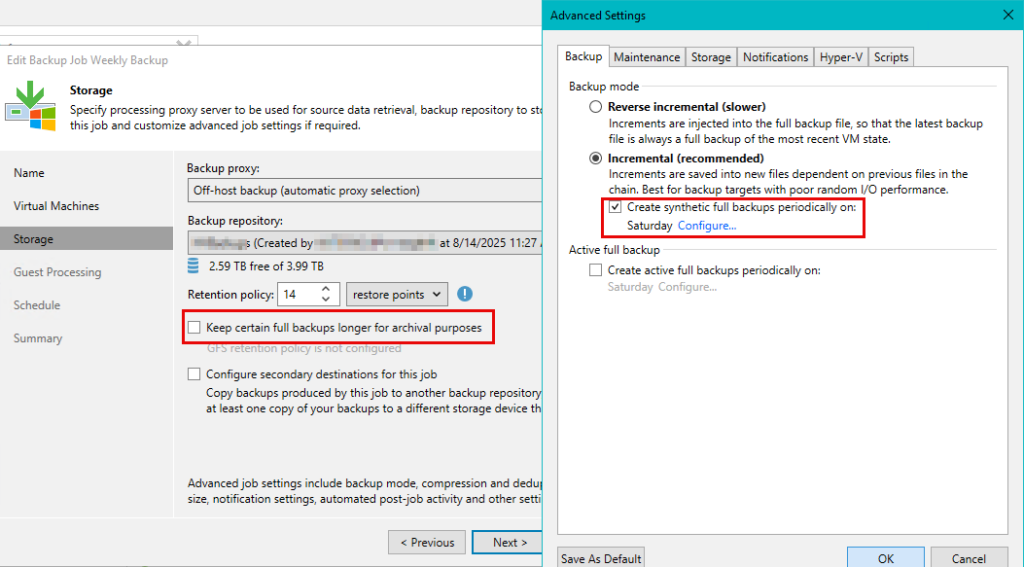
Synthetic Full
A synthetic full is still a full backup, but it is created from the backup files that already exist in the repository, instead of rereading all VM data again from production storage.
That means:
- it is a real full backup
- it is built from the existing full and incrementals already stored in the repository
- it reduces load on the production environment
- it increases load on the backup repository
Think of it like this:
A synthetic full is a new full backup assembled from existing backup files, not reread from the VM.
Active Full
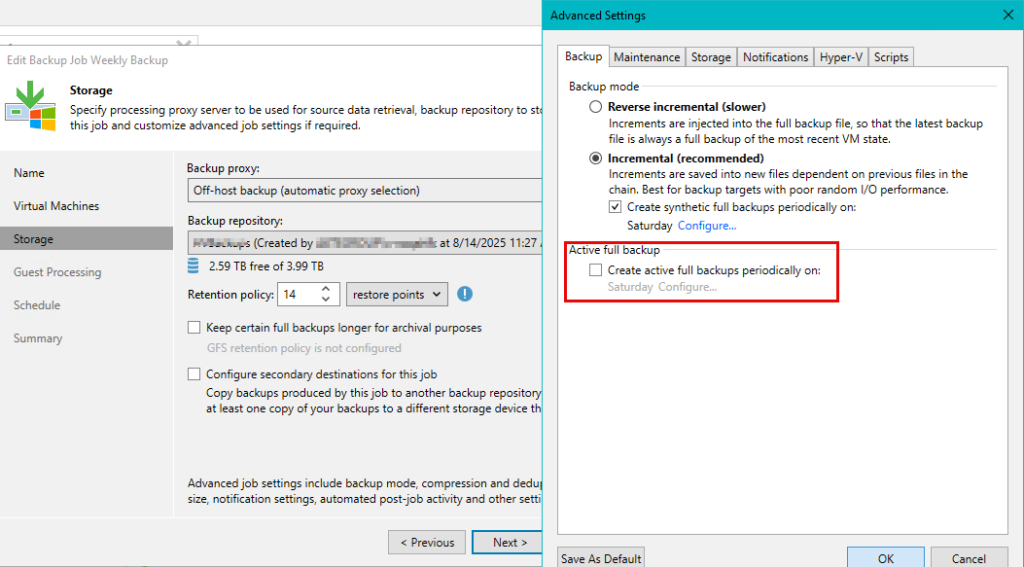
An active full is also a full backup, but unlike a synthetic full, it is created by reading the entire source VM again from production storage.
That means:
- it is a fresh new full taken from the source
- it puts more load on source storage, hosts, network, and backup window
- it does not rely on combining repository backup files to build the full
Think of it like this:
An active full is a brand new full backup reread from the VM or source storage.
Keep Certain Full Backups Longer for Archival Purposes
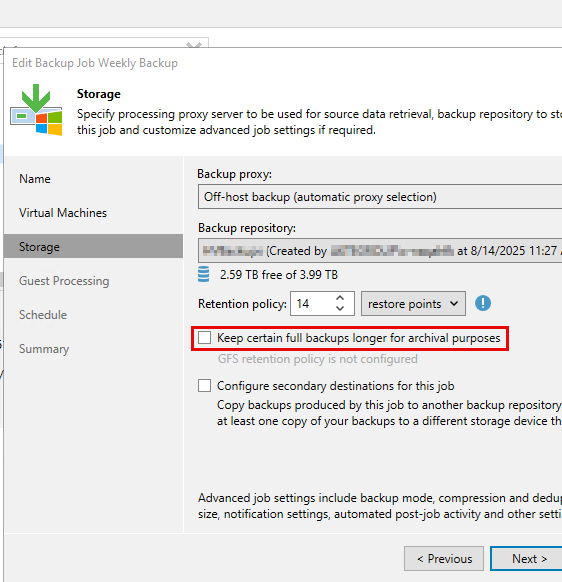
This option is GFS retention.
It does not create a new backup type by itself. It simply tells Veeam to keep some full backups for longer periods for archive purposes.
For example, you might keep:
- weekly fulls for several weeks
- monthly fulls for several months
- yearly fulls for several years
So this option is about retention, not backup creation.
2) What GFS Means in Veeam
GFS stands for Grandfather-Father-Son retention.
It is a long-term retention method used to preserve selected full backups for longer periods.
Simple Breakdown
- Son = daily or short-term backups
- Father = weekly backups
- Grandfather = monthly or yearly backups
Example
Suppose you configure:
- normal retention = 14 restore points
- GFS retention = keep:
- 4 weekly fulls
- 12 monthly fulls
- 3 yearly fulls
In that case, even when the normal short-term restore points expire, those selected weekly, monthly, and yearly full backups remain for archive purposes.
Important:
GFS is not a backup mode. It is a retention policy for selected full backups.
3) Incremental Backup with 14 Restore Points: What Happens?
Assume the following:
- backup mode = Incremental
- retention = 14 restore points
- backup job runs daily
- no synthetic full
- no active full
- no GFS
First, what is a restore point?
A restore point is a point in time that Veeam can restore to.
With daily backups:
- Day 1 backup = restore point 1
- Day 2 backup = restore point 2
- Day 3 backup = restore point 3
- and so on
In normal forward incremental mode, Veeam usually works like this:
- Day 1 = full backup (VBK)
- Day 2 onward = incrementals (VIB)
After Day 14
You have:
- 1 full backup
- 13 incrementals
- total = 14 restore points
You can restore to any point from Day 1 to Day 14.
What happens on Day 15?
Veeam creates a new incremental for Day 15. That would temporarily give you 15 restore points, but retention is only 14.
So Veeam removes the oldest restore point.
However, it usually does not simply delete the Day 1 VBK file immediately, because later incrementals still depend on it.
Instead, in the common forever-forward incremental behavior, Veeam typically:
- creates the new incremental
- merges the oldest incremental data into the VBK
- removes the oldest expired point from the chain
Result After Day 15
Available restore points become:
- Day 2
- Day 3
- Day 4
- …
- Day 15
So:
- the Day 1 restore point expires
- the VBK file usually remains, but it is rolled forward
Key distinction:
There is a difference between deleting the Day 1 restore point and deleting the Day 1 full backup file itself.
4) A Simple 4-Point Example to Make This Easier
To make the logic easier to see, let us reduce the example to 4 restore points.
Assume:
- Incremental mode
- Retention = 4 restore points
- No synthetic full
- No active full
Day 1
Files:
- VBK = Day 1 full
Restore points:
- Day 1
Day 2
Files:
- VBK = Day 1 full
- VIB-2
Restore points:
- Day 1
- Day 2
Day 3
Files:
- VBK
- VIB-2
- VIB-3
Restore points:
- Day 1
- Day 2
- Day 3
Day 4
Files:
- VBK
- VIB-2
- VIB-3
- VIB-4
Restore points:
- Day 1
- Day 2
- Day 3
- Day 4
Day 5
Veeam creates:
- VIB-5
Now there would be 5 restore points, but retention is only 4. So Veeam removes the oldest restore point.
After merge and cleanup, conceptually the chain becomes:
- VBK now represents Day 2
- VIB-3
- VIB-4
- VIB-5
Restore points become:
- Day 2
- Day 3
- Day 4
- Day 5
So:
- Day 1 restore point is gone
- VBK still exists
- but it no longer effectively represents the original Day 1 state
This is the easiest way to understand why the Day 1 restore point can expire without the full backup file itself disappearing immediately.
5) The Same Idea, but with Synthetic Full Enabled
Now assume:
- Incremental mode
- Retention = 4 restore points
- Synthetic full runs every Day 4
Day 1
- VBK-1 = Full backup of Day 1
Day 2
- VBK-1
- VIB-2
Day 3
- VBK-1
- VIB-2
- VIB-3
Day 4
This is the scheduled synthetic full day.
Veeam creates:
- VBK-4 = synthetic full representing Day 4
This new full is built from:
- VBK-1
- VIB-2
- VIB-3
and does not need to read the source VM again.
What changes here?
Without synthetic full:
- one chain keeps rolling forward
- the VBK is updated forward
With synthetic full:
- Veeam periodically creates new full backup files
- backup history becomes split into separate chains
- older chains can later be removed when they are outside retention
Easy analogy:
Without synthetic full, you keep editing the same notebook.
With synthetic full, every few days you create a new notebook using the old notebook plus the change pages.
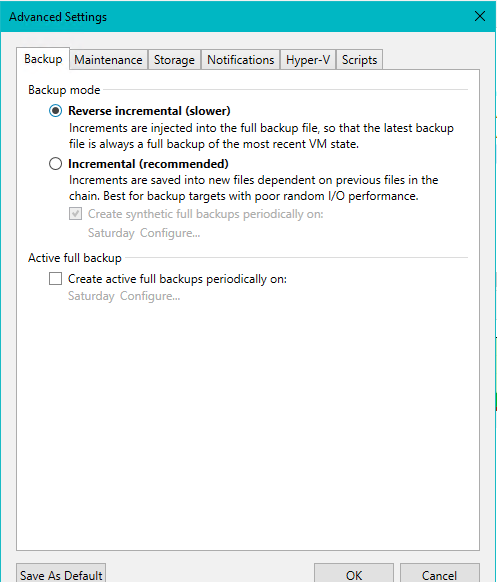
6) Reverse Incremental: The Same 14-Day Example
Now let us take the same 14-day example, but this time with:
- backup mode = Reverse Incremental
- retention = 14 restore points
- daily backup
- no active full
- no GFS
What is Reverse Incremental?
In reverse incremental mode:
- the latest backup state is always stored in the VBK full file
- each day’s previous state is stored in separate VRB files
So:
- VBK = latest point
- VRB files = older points
This is the opposite of forward incremental, where the VBK remains older and later points are stored as VIBs.
Day 1
Files:
- VBK = Day 1
Restore points:
- Day 1
Day 2
Veeam:
- injects Day 2 changes into the VBK
- creates a VRB file to preserve Day 1 state
Files:
- VBK = Day 2
- VRB-1 = Day 1
Restore points:
- Day 2 from VBK
- Day 1 from VRB-1
Day 3
Files:
- VBK = Day 3
- VRB-2 = Day 2
- VRB-1 = Day 1
Restore points:
- Day 3
- Day 2
- Day 1
Continue up to Day 14
After Day 14:
- VBK = Day 14
- VRB-13 = Day 13
- VRB-12 = Day 12
- …
- VRB-1 = Day 1
Restore points available:
- Day 14
- Day 13
- Day 12
- …
- Day 1
That gives you 14 restore points total.
What happens on Day 15?
Veeam:
- updates VBK to Day 15
- creates a new VRB for Day 14
- deletes the oldest VRB, which represents Day 1, because retention is only 14 points
So after Day 15, restore points become:
- Day 15
- Day 14
- Day 13
- …
- Day 2
Day 1 is gone.
Key difference from forward incremental:
In reverse incremental, the VBK is always the newest restore point.
7) Which Option Uses the Least Disk Space?
This is one of the most practical questions in any backup design.
General rule, from least to most storage usage
1) Incremental only, with no periodic fulls and no GFS
This usually uses the least disk space.
Why?
Because you keep:
- one base full
- then incrementals only
- no extra weekly or periodic fulls
2) Reverse Incremental
This usually consumes slightly more than plain forward incremental.
Why?
Because:
- the VBK is updated daily
- multiple VRB rollback files are kept
3) Incremental + Synthetic Full
This consumes more because periodic new full backup files are created.
4) Incremental + Active Full
This also consumes more because additional full backups are created.
5) Any mode + GFS retention
This usually consumes the most space, because selected weekly, monthly, quarterly, or yearly full backups are preserved for long periods.
Bottom line:
If your goal is minimum disk usage, the most space-efficient option is usually plain Incremental with no synthetic full, no active full, and no GFS.
But there is a trade-off
The most space-efficient option is not always the best operational choice. It usually means:
- a longer dependency chain
- fewer fresh fulls
- less convenient chain management
8) 14 Days vs 14 Restore Points
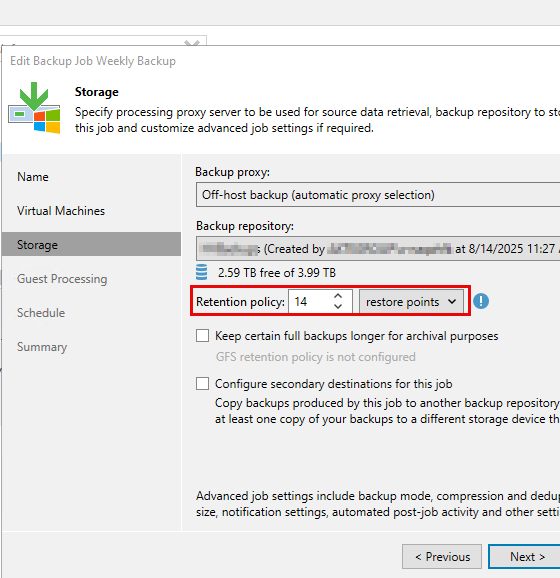
This setting changes the meaning of retention completely.
14 Restore Points
Veeam keeps the last 14 successful backup points, regardless of how old they are.
14 Days
Veeam keeps backups based on age in days, not count.
This becomes especially important when the job is not daily.
9) Weekly Backup Example: 14 Days vs 14 Restore Points
Assume:
- the backup job runs weekly, every Saturday
- no GFS
Case A: Retention = 14 Restore Points
With a weekly job:
- 1 restore point per week
- 14 restore points = roughly 14 weeks of backup history
So you could keep:
- Week 1
- Week 2
- Week 3
- …
- Week 14
Case B: Retention = 14 Days
With a weekly job:
- one backup every 7 days
- 14 days means only about 2 weekly backups are kept
Example Timeline
Week 1 — Day 1
First weekly backup runs.
Restore points:
- Week 1
Week 2 — Day 8
Second weekly backup runs.
Restore points:
- Week 1
- Week 2
Because Week 1 is only 7 days old, it is still retained.
Week 3 — Day 15
Third weekly backup runs.
Now the ages are approximately:
- Week 1 = 14 days old
- Week 2 = 7 days old
- Week 3 = 0 days old
After cleanup, Week 1 becomes eligible for expiration.
So you typically end up with:
- Week 2
- Week 3
Week 4 — Day 22
After cleanup, you typically keep:
- Week 3
- Week 4
Week 5 — Day 29
After cleanup, you typically keep:
- Week 4
- Week 5
Final Conclusion for Weekly Jobs
With a weekly job:
- 14 restore points = about 14 weekly backups
- 14 days = about 2 weekly backups
That is a huge difference, and it is one of the easiest ways to accidentally under-retain backups.
[Place Screenshot 6 here: the screenshot showing the retention dropdown where 14 can be either restore points or days.]
10) Comparison Table
| Mode / Option | How new backup is created | Where newest restore point is | What happens after retention is exceeded | Production load | Repository load | Main advantage | Main disadvantage |
|---|---|---|---|---|---|---|---|
| Incremental (forward incremental) | First full, then incrementals | In the full + incremental chain | Oldest restore point is removed by forward merge / rolling the chain | Low | Moderate | Efficient and common | Restore depends on chain |
| Reverse Incremental | Changes are injected into the full, previous state saved as VRB | In the VBK full file | Oldest VRB is deleted | Higher | Higher random I/O | Latest point always in full | Slower and heavier on storage |
| Synthetic Full | New full built from existing repository backup files | In a new synthetic VBK | Older chains can be deleted once outside retention | Low | High on synthetic full day | New fulls without stressing production | Heavy repository work |
| Active Full | New full reread from source VM or storage | In a new active full VBK | Older chains can be deleted once outside retention | High | Moderate | Fresh full from source | Heavy source and network load |
| GFS retention | Not a backup mode | N/A | Keeps selected weekly, monthly, or yearly fulls longer | Depends on mode | Depends on mode | Long-term archival retention | More storage usage |
11) Practical Recommendations
Choose plain Incremental when:
- your main goal is to save storage space
- you want a simple and efficient daily backup design
- you do not need periodic fresh fulls
Choose Incremental with Synthetic Full when:
- you want periodic new fulls
- you want to reduce load on production systems
- your repository can handle the extra work
Choose Incremental with Active Full when:
- you want a fresh full read directly from the source
- you can tolerate more source, storage, and network load
Choose Reverse Incremental when:
- you want the newest restore point always inside the VBK
- you understand the extra repository I/O that comes with it
Enable GFS when:
- you need weekly, monthly, quarterly, or yearly archives
- you are planning for long-term retention and compliance requirements
12) Final Takeaway
The most important thing to remember is this:
- Full backup = a complete backup
- Synthetic full = a full created from existing repository backup files
- Active full = a full created by rereading the source VM again
- Incremental = only changes after the first full
- Reverse incremental = latest point stays in the full file, older points are kept as reverse increments
- Restore points = number of points in time you can restore to
- Days = age-based retention, not count-based retention
- GFS = long-term retention of selected full backups
If you mix up restore points and days, especially on weekly jobs, your backup retention can end up very different from what you intended.
That is why understanding these settings before enabling them in production is so important.