

If you are new to Windows DHCP, some of the terms in the DHCP console can feel much more complicated than they really are. Two of the most confusing settings are Maximum Client Lead Time (MCLT) and State Switchover Interval. On top of that, many admins also hear about superscopes and wonder whether they are related to failover.
This guide explains all of them in simple language, using practical examples instead of dry definitions.
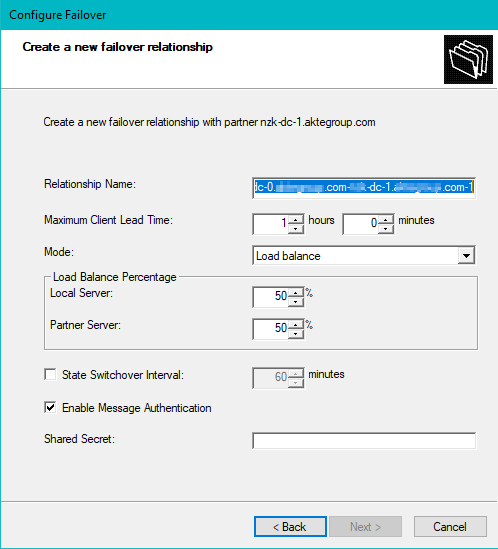
What DHCP Failover Really Does
DHCP failover allows two DHCP servers to share lease information so that if one server becomes unavailable, the other can continue serving IP addresses to clients.
Think of it like having two receptionists managing the same visitor list:
- Normally, both keep each other updated.
- If one receptionist disappears, the other can continue working.
- But there must be rules to avoid confusion and duplicate entries.
That is exactly why DHCP failover has settings like MCLT and State Switchover Interval.
The Main Options in the DHCP Failover Wizard
When you create a failover relationship, Windows DHCP shows several settings. Here is what each one means.
Relationship Name
This is simply the name of the failover partnership.
It is only a label for identification. It does not change how DHCP behaves.
Examples:
HQ-DHCP-FailoverDC1-DC2-DHCPMainOffice-DHCP
Maximum Client Lead Time (MCLT)
This is one of the most important settings in DHCP failover.
MCLT is a lease safety timer. It limits how far one DHCP server can safely act on its own when it has not recently synchronized with its partner.
In beginner-friendly terms, MCLT means:
“If I cannot talk to my failover partner right now, I am still allowed to continue serving clients, but only in a controlled and safe way.”
A common value is 1 hour, which is what you often see in the wizard.
Mode
The mode decides how the two DHCP servers will operate.
Load Balance
In Load Balance mode, both DHCP servers are active at the same time and both answer clients.
This is the most common option in normal environments.
Hot Standby
In Hot Standby mode, one DHCP server is active and the other stays in reserve as a backup.
This is useful when one server is the preferred server and the other is mainly for disaster recovery.
Load Balance Percentage
If you choose Load Balance mode, you will see the load distribution between the two servers.
For example:
- Local server: 50%
- Partner server: 50%
That means both servers share the DHCP workload equally.
This does not mean half the IP range is permanently owned by one server and half by the other. The servers still coordinate through failover.
State Switchover Interval
This is another important setting, but it is very different from MCLT.
State Switchover Interval is an automatic failover state timer.
It means:
“If I cannot communicate with my failover partner for this long, I will automatically switch state and assume the partner is unavailable.”
So while MCLT is about lease safety, State Switchover Interval is about automatic takeover timing.
Enable Message Authentication
This secures the communication between the two DHCP servers.
When enabled, the servers authenticate failover messages so each one can trust that the communication is really coming from the correct partner.
This is usually a good idea.
Shared Secret
If Message Authentication is enabled, you must provide a shared secret.
This is like a password used by both DHCP servers to authenticate failover traffic.
Use a strong secret and store it safely.
The Most Confusing Part: MCLT vs State Switchover Interval
This is where many beginners get stuck.
Both settings involve time, so they look similar. But they control completely different things.
The Shortest Possible Explanation
- MCLT = controls lease safety
- State Switchover Interval = controls automatic state change
That is the core difference.
MCLT Explained Simply
MCLT stands for Maximum Client Lead Time.
When the two DHCP servers are communicating normally, this setting is mostly invisible in day-to-day operations.
It becomes important when:
- the servers stop talking to each other
- the failover link is interrupted
- one server needs to continue serving leases without current partner synchronization
MCLT limits how freely a server can extend or manage leases when it is not fully synchronized with its partner.
Simple analogy
Imagine two librarians managing the same set of borrowed books.
Normally, both librarians update the same records.
If one librarian suddenly loses contact with the other, there must be a safety rule like this:
“Until contact is restored, you may only make limited temporary extensions.”
That limited extension rule is similar to MCLT.
Important clarification
MCLT does not mean the client only gets a 1-hour lease.
If your lease duration is 8 days, it is still 8 days. MCLT is a safety control in the failover relationship, not the normal lease duration itself.
State Switchover Interval Explained Simply
State Switchover Interval is about when DHCP automatically changes failover state after communication with the partner is lost.
Simple analogy
Using the same librarian example:
“If you do not hear from the other librarian for 60 minutes, you may assume they are unavailable and take over fully.”
That 60-minute waiting policy is like State Switchover Interval.
What it does not do
It does not define lease safety rules. That is MCLT’s job.
Timeline Example: Same Value, Different Purpose
Suppose you configure:
- MCLT = 1 hour
- State Switchover Interval = 60 minutes
Now imagine the DHCP servers lose communication at 9:00 AM.
9:00 AM
Communication between the two DHCP servers is lost.
9:10 AM
A client sends a renewal request.
The DHCP server can still continue serving the client, but it follows the lease safety rules controlled by MCLT.
9:30 AM
The partner server is still unreachable.
The server is still being cautious. The relationship has not yet automatically switched state.
10:00 AM
The State Switchover Interval expires.
Now the DHCP server can automatically change to the appropriate failover state, such as moving toward Partner Down handling.
Why this matters
In the same outage:
- MCLT controlled how cautiously leases were handled
- State Switchover Interval controlled when automatic failover state transition happened
So even though both values were “1 hour,” they were doing different jobs.
Example: State Switchover Disabled
Now imagine this configuration:
- MCLT = 1 hour
- State Switchover Interval = disabled
The servers lose communication.
What happens?
- MCLT still matters, because the server still needs lease safety rules.
- But the server will not automatically switch state after 1 hour.
- An administrator may need to intervene manually depending on the situation.
This is one of the clearest ways to understand that MCLT and State Switchover Interval are not the same thing.
Example: Short Network Interruption
Suppose the failover link goes down for only 10 minutes.
- MCLT-related safety behavior still matters during that interruption.
- But if the interruption ends before the State Switchover Interval expires, there may be no automatic state change at all.
Again, that shows the difference:
- MCLT affects safe lease handling during the interruption.
- State Switchover Interval affects whether the interruption lasts long enough for automatic failover state transition.
Simple Side-by-Side Comparison
| Setting | What it controls | Beginner meaning |
|---|---|---|
| MCLT | Lease safety | How cautiously the server handles leases when not fully synchronized |
| State Switchover Interval | Automatic failover state change | How long the server waits before automatically assuming the partner is unavailable |
Practical Beginner Recommendation
In many normal environments, a common starting point is:
- Mode: Load Balance
- Load Balance Percentage: 50/50
- MCLT: 1 hour
- Enable Message Authentication: Enabled
- Shared Secret: Strong secret
- State Switchover Interval:
- Enable it if you want automatic behavior
- Leave it disabled if you want manual control
If both DHCP servers are in the same site with stable connectivity, many admins are comfortable enabling automatic switchover.
If you want stricter control, you may leave it disabled and handle state changes manually.
What a Superscope Is
A superscope is a completely different DHCP concept.
It is not a failover feature.
A superscope is a way to group multiple DHCP scopes on the same physical network.
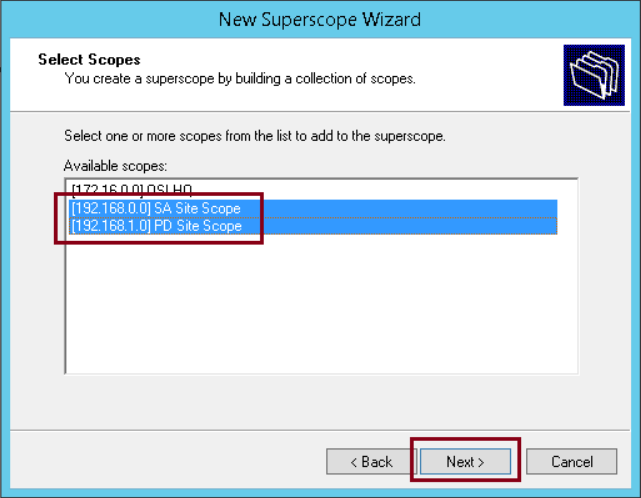
Beginner explanation
Suppose you originally had this subnet:
192.168.10.0/24
But it became full.
Instead of redesigning immediately, you add another subnet:
192.168.20.0/24
Then you group both scopes into one superscope.
This allows the DHCP server to offer addresses from either scope on the same physical segment.
Important note
A superscope does not merge two subnets into one. It only tells DHCP that multiple scopes belong to the same physical network.
Why admins use superscopes
Superscopes are usually used when:
- the old subnet ran out of addresses
- a migration to a new subnet is in progress
- multiple logical IP ranges must exist on the same physical LAN
The catch
If clients on the same physical network receive addresses from different subnets, your router or Layer 3 gateway must support both subnets properly.
That is why superscopes can become confusing if they are used long term.
Superscope vs Failover
These two are very different:
DHCP Failover
- two DHCP servers
- shared lease information
- redundancy and availability
Superscope
- multiple scopes on the same physical network
- primarily an addressing design tool
- not a redundancy feature
You can have one without the other.
Superscope vs Split Scope
Another common source of confusion is split scope.
Superscope
- multiple different subnets
- same physical network
Split Scope
- usually the same subnet divided across two DHCP servers
- older design used before DHCP failover became common
In modern Windows DHCP deployments, failover is usually preferred over split scope.
Best Practices and Extra Notes
Prefer DHCP failover over split scopes
If you want redundancy between two Windows DHCP servers, DHCP failover is normally the better and more modern choice.
Use load balancing only when both servers are healthy and well connected
Load Balance mode works very well when both servers are stable and have reliable connectivity.
Use Hot Standby for DR-style designs
If one server is in a disaster recovery site or you want one clear primary server, Hot Standby may make more sense.
Do not confuse lease duration with MCLT
This is a very common mistake. Lease duration is what clients normally receive. MCLT is an internal safety control for failover behavior.
Use superscopes carefully
Superscopes can solve short-term addressing problems, but they also make routing and troubleshooting more complex. A proper subnet redesign is often cleaner in the long run.
Final Takeaway
If you remember only three things from this guide, remember these:
- MCLT is about lease safety.
- State Switchover Interval is about automatic state change timing.
- Superscopes are unrelated to failover and are used to group multiple scopes on the same physical network.
Once you separate those three ideas in your mind, DHCP failover becomes much easier to understand.
Quick Summary
- MCLT: Safety limit for lease handling when a DHCP server is not fully synchronized with its partner
- State Switchover Interval: Automatic timer for changing failover state after partner communication is lost
- Superscope: A group of multiple scopes on the same physical network, usually for subnet expansion or migration