

Introduction
Organizations are increasingly moving user desktops to the cloud to support remote work, simplify management, and improve security. Microsoft offers two primary desktop virtualization solutions:
- Windows 365 (Cloud PC)
- Azure Virtual Desktop (AVD)
Although both solutions provide cloud-hosted Windows desktops, they are designed for different use cases and offer different levels of flexibility, scalability, and management.
This article explains:
- Windows 365 vs Azure Virtual Desktop
- AVD Host Pool Types
- Windows 11 Enterprise Multi-Session
- FSLogix Profile Containers
- Storage Sizing and Design
- Best Practices for Production Deployments
Windows 365 vs Azure Virtual Desktop
Windows 365
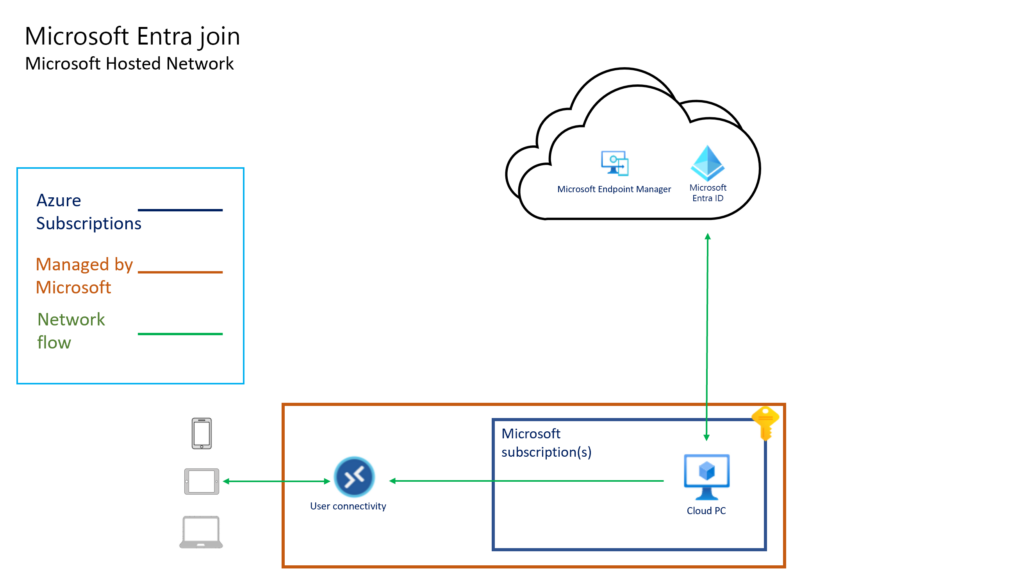
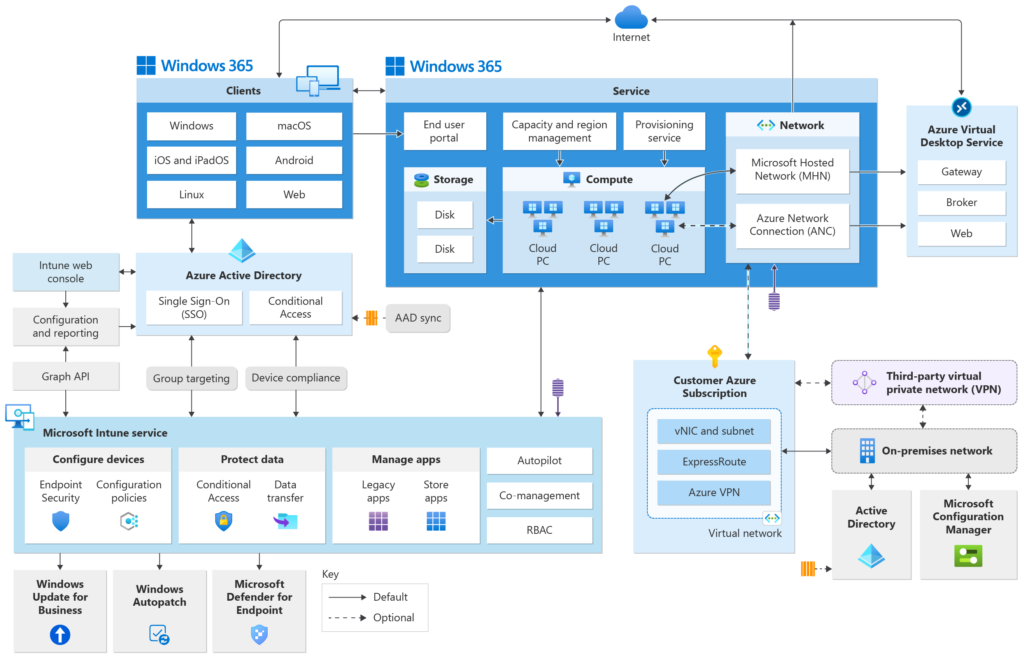
Windows 365 provides a dedicated Cloud PC for each user.
Think of it as:
One user = One cloud-hosted PC
Each Cloud PC has dedicated resources such as:
- CPU
- Memory
- Storage
The user always connects to the same Cloud PC.
Advantages
- Simple deployment
- Predictable monthly cost
- No host pool management
- No FSLogix management
- Ideal for executives, contractors, and remote workers
Disadvantages
- More expensive at scale
- No multi-session capability
- Limited optimization opportunities
Azure Virtual Desktop (AVD)
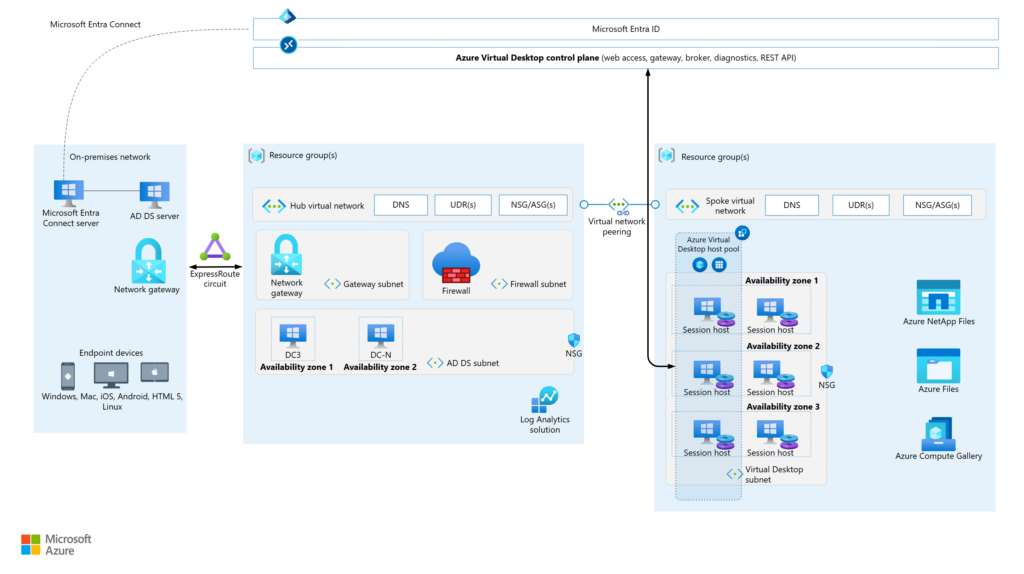
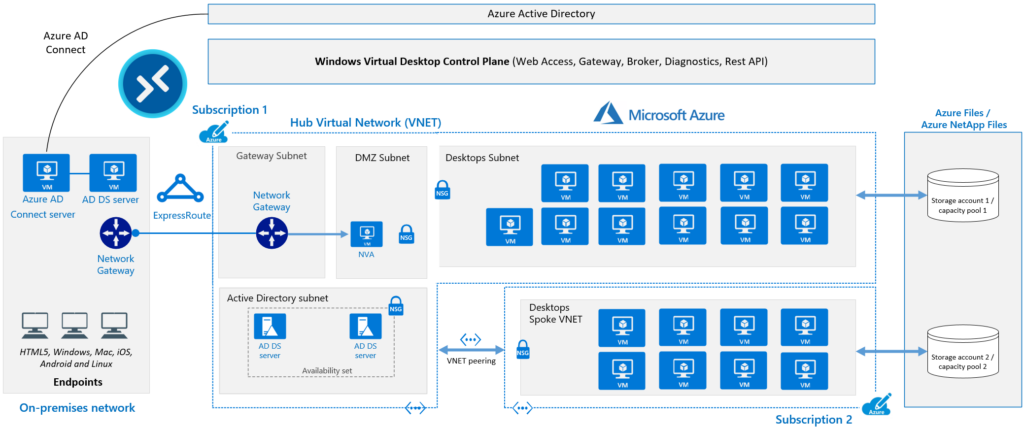
Azure Virtual Desktop is Microsoft’s cloud-based VDI platform.
Instead of assigning a dedicated VM to every user, multiple users can share virtual machines.
AVD supports:
- Multi-session desktops
- Dedicated desktops
- Remote applications
- Autoscaling
- Custom images
- Advanced networking
Advantages
- Lower cost at scale
- Multi-session support
- Full Azure integration
- Autoscaling capabilities
- Greater flexibility
Disadvantages
- More complex to deploy
- Requires infrastructure management
- Requires profile management using FSLogix
Understanding AVD Host Pools
A Host Pool is a collection of Session Host virtual machines.
Users connect to the Host Pool, and AVD determines which VM will handle the session.
There are two main Host Pool types.
Pooled Host Pool
In a pooled host pool, multiple users share the same session host VMs.
Example:
- VM1 hosts 12 users
- VM2 hosts 14 users
- VM3 hosts 10 users
All users share the same underlying infrastructure.
Advantages
- Lowest cost
- Highest scalability
- Efficient resource utilization
Ideal For
- Office workers
- ERP users
- Call centers
- Shared desktop environments
           POOLED HOST POOL

 User1 ----\
 User2 -----\
 User3 ------> VM1
 User4 -----/
 User5 ----/

 User6 ----\
 User7 -----\
 User8 ------> VM2
 User9 -----/
 User10 ----/
Personal Host Pool
In a personal host pool, each user receives a dedicated VM.
Example:
- User A → VM1
- User B → VM2
- User C → VM3
Users always reconnect to their assigned machine.
Advantages
- Full isolation
- Custom software support
- Easier troubleshooting
Ideal For
- Developers
- Engineers
- Administrators
- Users requiring elevated permissions
           PERSONAL HOST POOL

 User1 ---------- VM1

 User2 ---------- VM2

 User3 ---------- VM3
Windows 11 Enterprise Multi-Session
One of the most unique AVD features is Windows 10/11 Enterprise Multi-Session.
Normally:
- Windows 10 supports one interactive session
- Windows 11 supports one interactive session
If a second user logs in, the first user is disconnected.
However, Microsoft created a special Azure-only version called:
Windows 10/11 Enterprise Multi-Session
This version allows multiple users to log in simultaneously.
Example:
- One Windows 11 VM
- 16 GB RAM
- 10 users connected concurrently
The operating system behaves similarly to an RDS server while preserving the Windows 11 desktop experience.
Load Balancing in Pooled Host Pools
AVD offers two load balancing methods.
Breadth-First
Users are distributed evenly across available VMs.
Example:
- VM1 = 5 users
- VM2 = 5 users
- VM3 = 5 users
Benefits
- Better performance consistency
- Lower resource contention
Drawback
- More VMs remain powered on
             BREADTH-FIRST

 VM1 = 5 users
 VM2 = 5 users
 VM3 = 5 users
Depth-First
AVD fills one VM before moving to the next.
Example:
- VM1 = 12 users
- VM2 = 10 users
- VM3 = 0 users
Benefits
- Better cost optimization
- Supports aggressive autoscaling
Drawback
- Higher resource utilization per VM
For most production environments focused on cost savings, Depth-First is recommended.
             DEPTH-FIRST

 VM1 = 14 users
 VM2 = 14 users
 VM3 = 2 users
What is FSLogix?
FSLogix is Microsoft’s profile container technology.
It solves one of the biggest challenges in pooled virtual desktop environments:
User profiles must follow the user regardless of which session host they connect to.
Without FSLogix:
- Users receive different profiles on different VMs
- Outlook reconfigures repeatedly
- Desktop settings disappear
- Login times increase
How FSLogix Works
When a user logs in:
- AVD authenticates the user
- FSLogix locates the user’s profile container
- The profile container is mounted
- The VHDX file becomes the user’s profile
Example:
\Storage\Profiles\UserA.vhdx
This virtual disk contains:
- Desktop
- AppData
- Outlook profile
- Teams cache
- User settings
- Registry profile data
The user experiences the same desktop regardless of which session host they use.
          USER LOGIN FLOW

 User
   |
   V

 Session Host
   |
   V

 Azure Files
   |
   +------------------+
   | UserA.vhdx       |
   | UserB.vhdx       |
   | UserC.vhdx       |
   +------------------+

   |
   V

 User Profile Mounted
 As C:\Users\UserA
Why FSLogix is Critical
Imagine a pooled host pool with:
- Session Host 1
- Session Host 2
- Session Host 3
Day 1:
User logs into Session Host 1.
Day 2:
User logs into Session Host 3.
Without FSLogix:
- Different desktop
- Different settings
- Outlook rebuilds
With FSLogix:
- Same profile
- Same desktop
- Same Outlook configuration
The user never notices the difference.
FSLogix Storage Design
The most common storage options are:
| Storage Type | Recommendation |
|---|---|
| Azure Files Premium | Recommended |
| Azure NetApp Files | High Performance |
| SMB File Server | Possible but requires more management |
Most organizations deploy:
- Azure Files Premium
- Private Endpoint
- Active Directory integration
Sizing FSLogix Storage
Typical profile sizes:
| User Type | Average Size |
|---|---|
| Light User | 3-8 GB |
| Medium User | 8-20 GB |
| Heavy User | 20-50 GB |
Example:
75 users × 15 GB average profile
= 1.1 TB
Add growth capacity and backup overhead:
Recommended storage:
1.5 TB
FSLogix Optimization Best Practices
Exclude Temporary Data
Examples:
- Browser cache
- Temporary files
- Application cache folders
This prevents unnecessary profile growth.
Use OneDrive Known Folder Move
Instead of storing large document libraries inside the profile container:
- Redirect Desktop
- Redirect Documents
- Redirect Pictures
to OneDrive.
Benefits:
- Smaller FSLogix profiles
- Faster logins
- Reduced storage costs
Set Profile Size Limits
Example:
30 GB maximum profile size
This prevents uncontrolled growth.
Profile Locking and Concurrent Sessions
FSLogix mounts the profile VHDX exclusively.
This means:
One profile container = One active mount
Best practice:
Enable:
Single Session Per User
This ensures:
- Users reconnect to existing sessions
- No profile conflicts occur
- Profile corruption risk is minimized
Example Production Design (80 Users)
Host Pool
Type:
Pooled
Load Balancing:
Depth-First
Session Hosts
7 × D8s_v5
Each host supports approximately:
12-15 users
Profile Storage
Azure Files Premium
2 TB provisioned capacity
Security
- Microsoft Entra ID
- MFA
- Conditional Access
- Private Endpoints
- No public RDP exposure
Autoscaling
Business Hours:
- All hosts online
After Hours:
- Hosts automatically shut down
This significantly reduces Azure compute costs.
                USERS
                  |
                  V

          Microsoft Entra ID
                  |
                  V

              Host Pool
                  |
     --------------------------
     |    |    |    |    |    |
    VM1  VM2  VM3  VM4  VM5  VM6
     |    |    |    |    |    |
     --------------------------
                  |
                  V

          Azure Files Premium
             (FSLogix)

                  |
                  V

            Corporate Apps
When Should You Choose Windows 365?
Choose Windows 365 when:
- Simplicity is important
- You need dedicated desktops
- You have a small number of users
- You want minimal management overhead
When Should You Choose Azure Virtual Desktop?
Choose Azure Virtual Desktop when:
- You need cost optimization
- You have many users
- You want multi-session capability
- You require advanced customization
- You need autoscaling
Final Thoughts
Windows 365 and Azure Virtual Desktop are both excellent cloud desktop solutions, but they serve different purposes.
Windows 365 focuses on simplicity and dedicated Cloud PCs.
Azure Virtual Desktop focuses on flexibility, scalability, and cost efficiency.
For organizations deploying pooled virtual desktops, Windows 11 Enterprise Multi-Session and FSLogix are the technologies that make AVD practical, scalable, and cost-effective.
Understanding Host Pools, FSLogix, storage design, and load balancing is essential for building a successful Azure Virtual Desktop environment.